
An API you can work with
Build the frontend.
Don’t wait for the backend.
Turn an OpenAPI document into a running local API. Start with generated responses, then add the behavior your frontend needs.
TypeScript handlers · Shared state · Hot reload
// api/routes/pets.ts
import type { Routes } from "../types/index.js";

export const GET: Routes["/pets"]["GET"] = function ($) {
  return $.response.status(200).json(
    $.context.pets
  );
};[{ "id": 1, "name": "Fluffy" }]An example custom handler backed by a context.
Why Counterfact
-
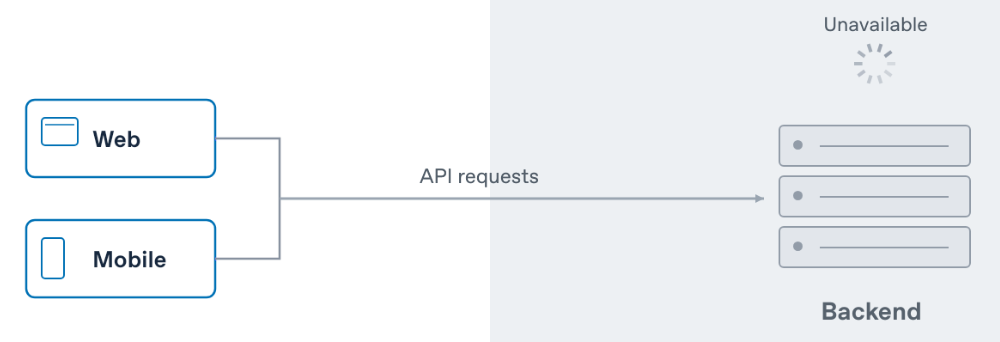
The backend isn’t ready
Frontend work shouldn’t have to wait for the backend. When an API is unavailable or a feature hasn’t been built yet, developers still need a way to build and test the clients that depend on it.
Scroll horizontally on small screens. Open the full-size diagram
-
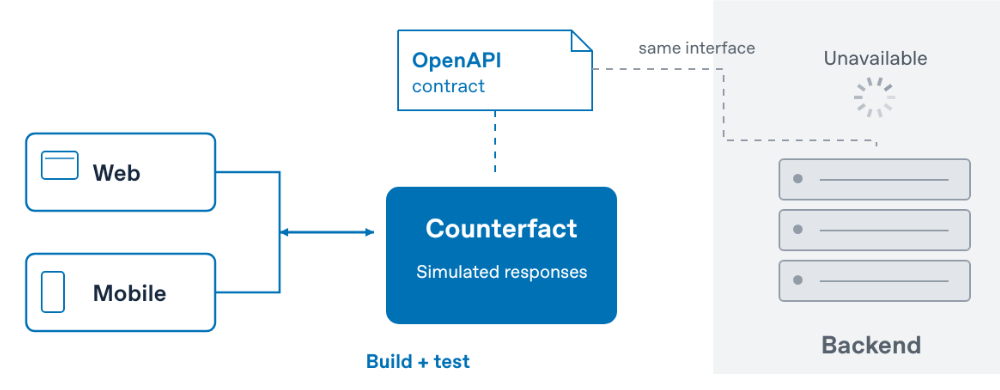
Counterfact implements the contract
Give Counterfact an OpenAPI contract, and it provides a working API for your web and mobile clients. Develop against that contract, simulate new functionality, and test errors and edge cases without waiting for the live backend.
Scroll horizontally on small screens. Open the full-size diagram
-
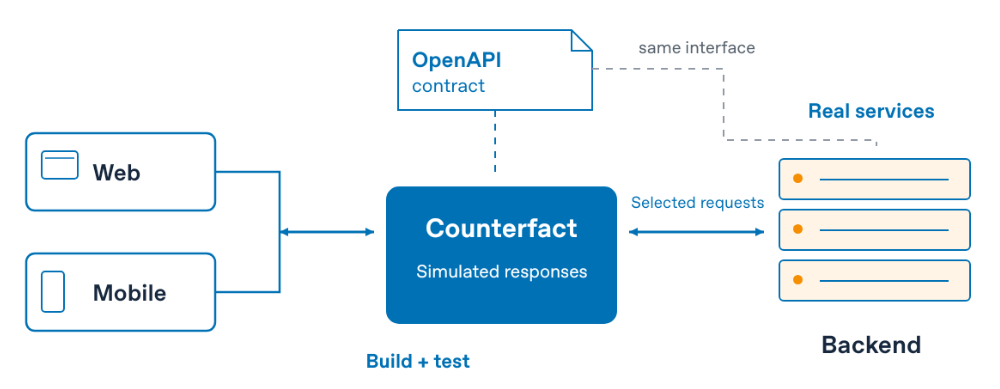
Mix simulated and real responses
Simulate new functionality, errors, and edge cases. Use real services when useful.
Scroll horizontally on small screens. Open the full-size diagram
The OpenAPI document describes the interface. Counterfact handles requests and returns simulated responses or forwards selected requests to a real service.
From contract to localhost
One command to get moving.
Counterfact creates editable routes and generated types, then starts
an HTTP server. Connect your client to localhost:3100.
npx counterfact@latest https://petstore3.swagger.io/api/v3/openapi.json api
Node.js 22+. Swagger 2.0 and OpenAPI 3.0–3.2.
Install a pinned version
for a repeatable project, and commit the lockfile.
Run in a new directory. Try http://localhost:3100/pet/1
or open Swagger UI
after the server starts. Use your own OpenAPI document in place of
the example URL.
Grow the simulation with your client
From sample data to a complete workflow.
Start with useful responses
Generate sample data, choose named examples, or write exactly the response a screen needs.
Shape a response → 02 / REMEMBERModel what happens next
Create a resource, read it back, and move through a workflow using small in-memory contexts.
Add shared state → 03 / EXPERIMENTMake the difficult cases happen
Try empty results, slow requests, and failures. Save a handler and keep working with hot reload.
Exercise an edge case → 04 / REPEATBring the API into your tests
Start a simulator, apply a scenario, reset its state, and stop it when the suite finishes.
Use Counterfact from code →Catch changed assumptions before integration.
Regenerate handler types when the OpenAPI contract changes, then run an explicit TypeScript check. Give client and server teams earlier feedback alongside runtime validation and real-backend tests.
Documentation
Learn a feature. Look up a detail.
Understand what you can do.
25 features, from your first generated API to scenarios, proxying, multiple APIs, and test integration.
Open the manual → API REFERENCEFind the exact contract.
CLI configuration, handler arguments, response builders, lifecycle methods, and the HTTP Admin API.
Open the reference →